Instalación y cableado de un controlador de potencia de doble salida CP2-4-5
LEA ANTES DE INSTALAR
- Instale y/o use Levven de acuerdo con los códigos y regulaciones eléctricas locales.
- Los controladores Levven deben montarse en cajas de empalme eléctricas de tamaño adecuado para cumplir con el código eléctrico de su área. Recomendamos usar cajas de empalme de plástico para un rendimiento óptimo. Si se está utilizando una caja de metal, asegúrese de que la antena del controlador sobresalga de la caja de empalme.
- Si tiene dudas sobre alguna parte de estas instrucciones, consulte a un electricista calificado.
Herramientas y Materiales
Necesitará:
- Destornillador Philips para acceder a la caja eléctrica.
- Escalera o banquito para alcanzar el accesorio del techo.
- Conectores de cable / Marettes para conectar los cables.
- Probador de circuito (opcional).
- Pelacables (opcional).
Pasos de Cableado
Los controladores deben montarse en cajas de conexiones de un tamaño adecuado para cumplir con el código eléctrico local.
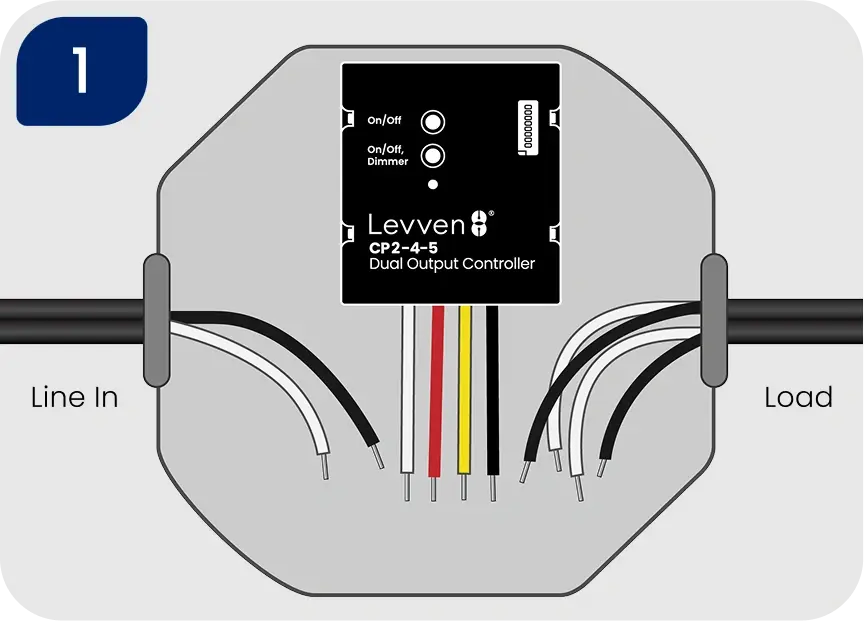
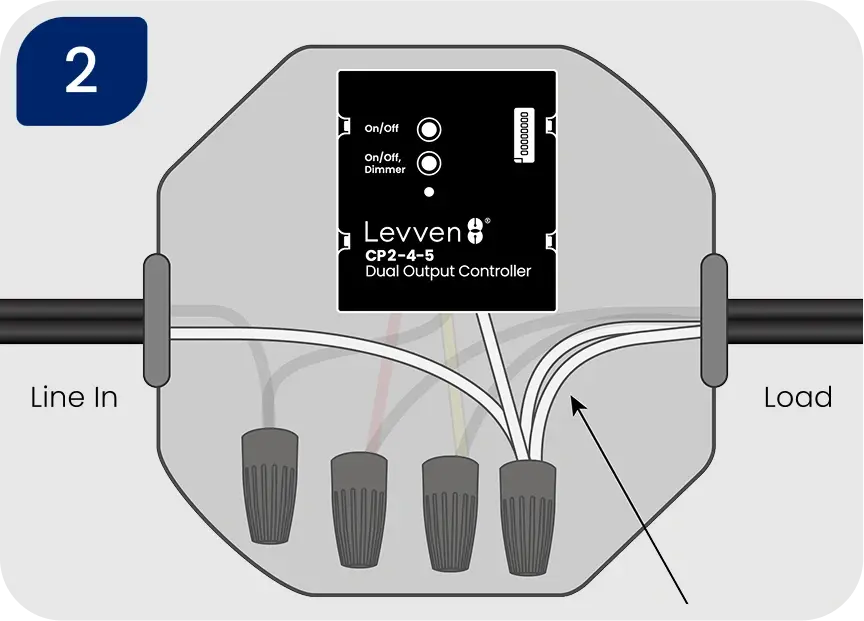
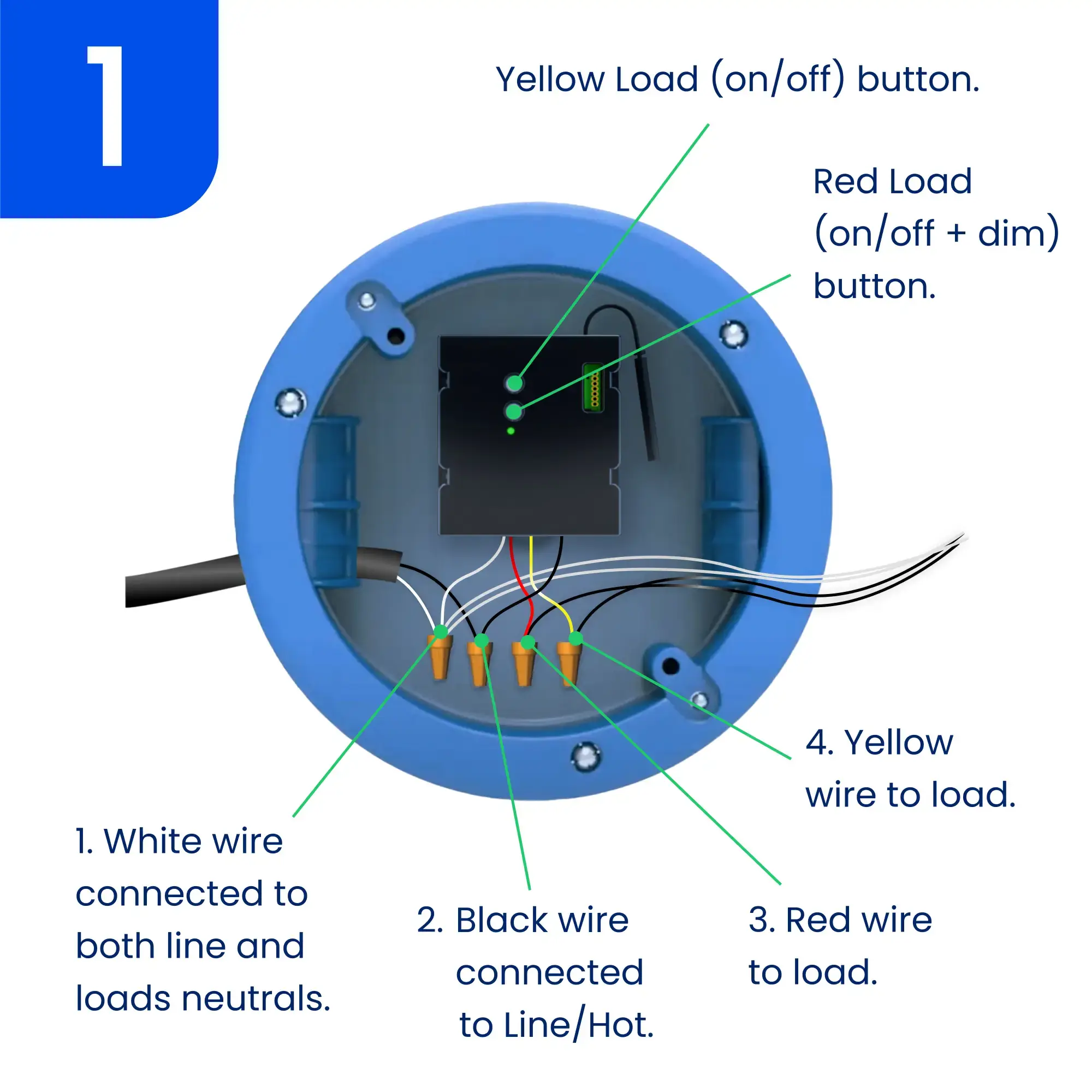
2. Conecte juntos los cables blancos de la alimentación, las cargas y el controlador
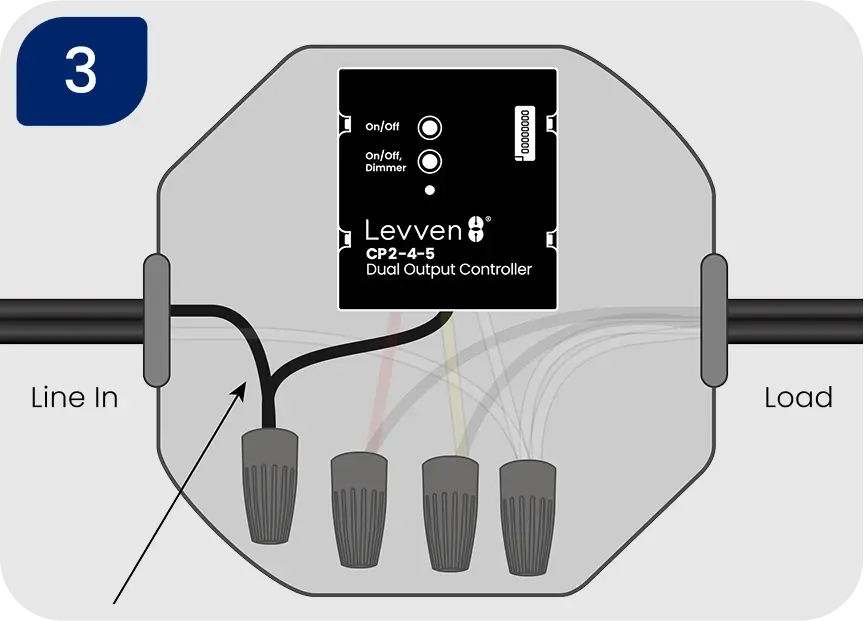
3. Conecte el cable negro de alimentación al cable negro del controlador
4. Conecte el cable rojo del controlador al cable negro de la carga que requiere función de atenuación. Conecte el cable amarillo del controlador al cable negro de la carga que solo requiere control de encendido/apagado.
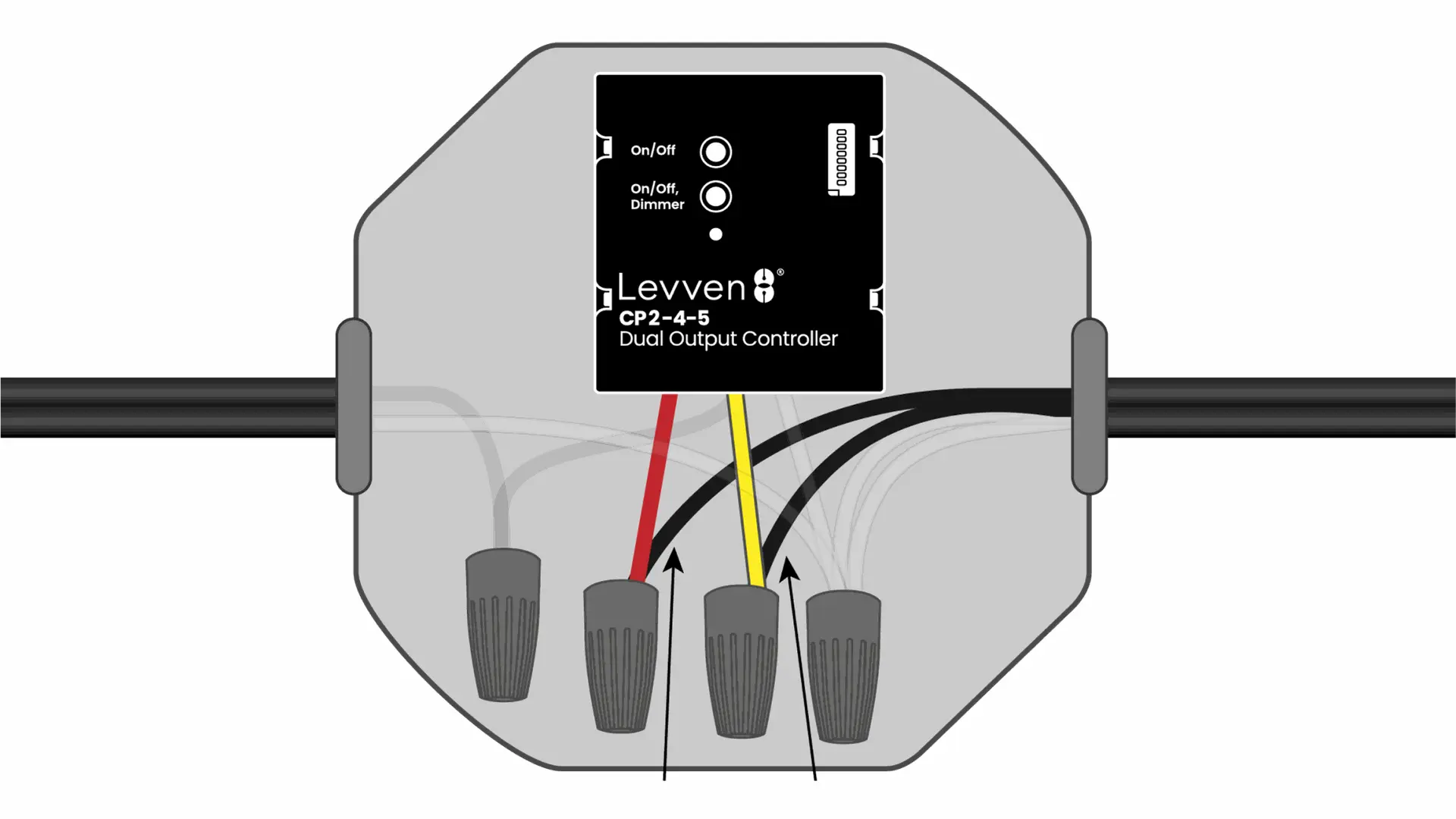
Cuando las conexiones estén completadas de forma segura, vuelva a encender la alimentación en el interruptor automático. El LED del controlador de potencia debería encenderse en verde fijo.
Ha cableado correctamente el controlador Levven CP1-4.
Continúe para agrupar múltiples controladores, o empareje interruptores a su controlador.
Cuando Instale Más de Un Controlador
Crear un 'Grupo Principal' para los Controladores
Los controladores deben estar en el mismo grupo para funcionar juntos.
- Los controladores solo se comunicarán con otros dispositivos en el mismo grupo.
- Ignoran las señales de los dispositivos que no están en el mismo grupo.
Un interruptor solo puede controlar los controladores que están en el mismo grupo.
Cuando añada una pasarela Levven Q a su casa, solo verá y controlará los dispositivos de su grupo.
Cómo Agregar un Controlador a un Grupo
Presione y suelte uno de los botones de grupo/emparejamiento del primer controlador o de cualquier controlador que ya forme parte de un grupo. El LED de este controlador parpadeará en verde para indicar el modo de emparejamiento. Para cancelar, simplemente presione y suelte el mismo botón nuevamente.
Presione y suelte uno de los botones de grupo/emparejamiento del nuevo controlador que se está agregando al grupo. El LED del controlador parpadeará en verde.
El LED del primer controlador comenzará a parpadear en rojo y verde para confirmar que se ha recibido una señal.
4. Presione y suelte el mismo botón de grupo/emparejamiento en el primer controlador para completar la agrupación. El LED de ambos controladores parpadeará en verde tres veces para confirmar la agrupación. El proceso de agrupación se cancelará automáticamente después de 60 segundos, y es posible que deba iniciar el proceso nuevamente.
Repita este proceso para añadir todos los controladores al mismo grupo.
Emparejar un Interruptor a un Controlador
Los interruptores envían comandos de encendido/apagado al controlador. Puede emparejar hasta 10 interruptores a cada salida del controlador CP2-4-5.
¿Cuántos Interruptores se Pueden Emparejar?
Hasta 10 interruptores diferentes pueden emparejarse con cada salida del controlador de potencia CP2-4-5.
- Esto es útil para los interruptores multidireccionales (o de múltiples vías).
- Por ejemplo, puede tener un interruptor en la parte inferior de las escaleras y otro en la parte superior. Ambos interruptores pueden controlar la misma luz de la escalera emparejando los interruptores con el mismo controlador.
Emparejar un Interruptor a un Controlador Manualmente
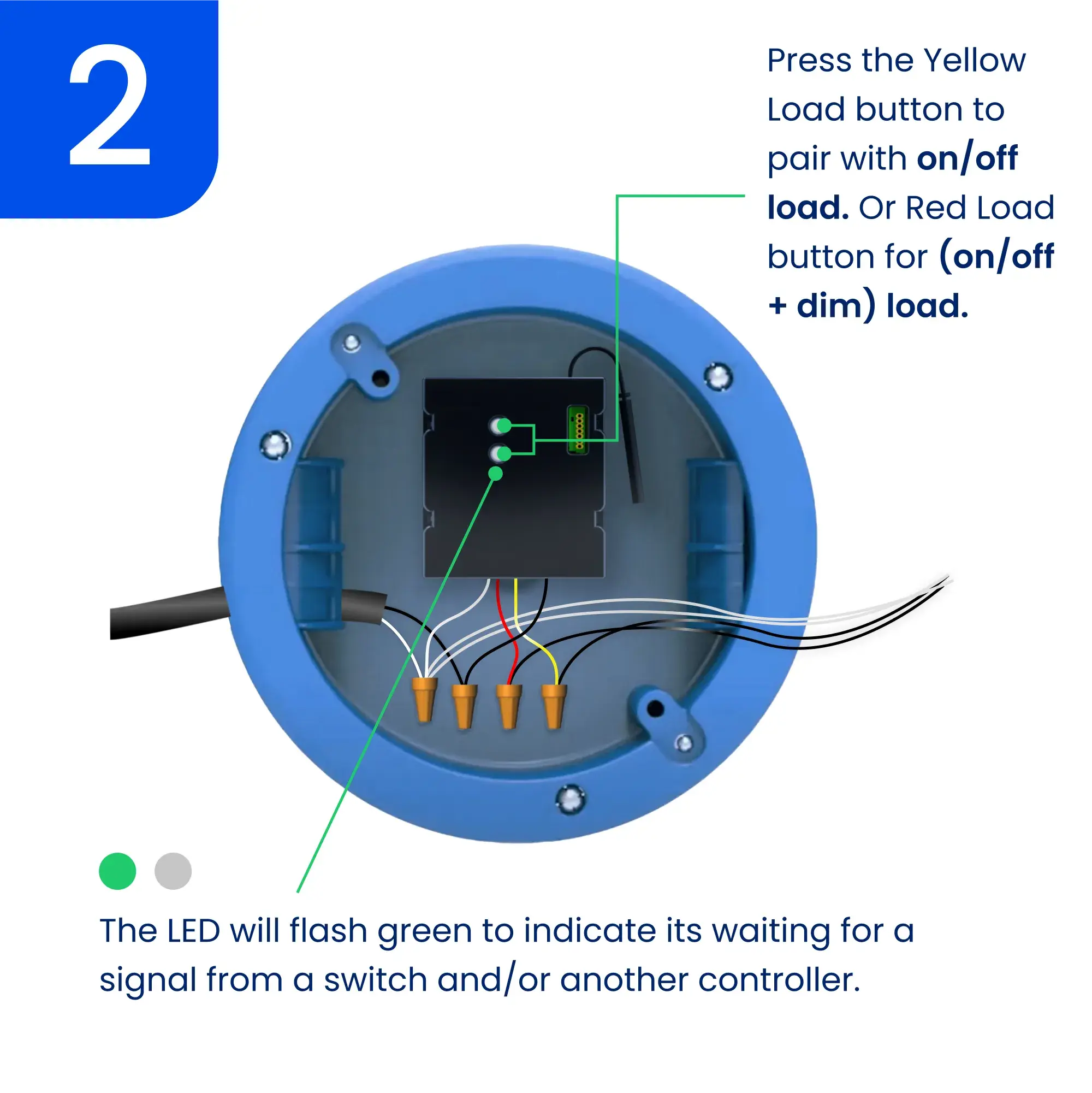
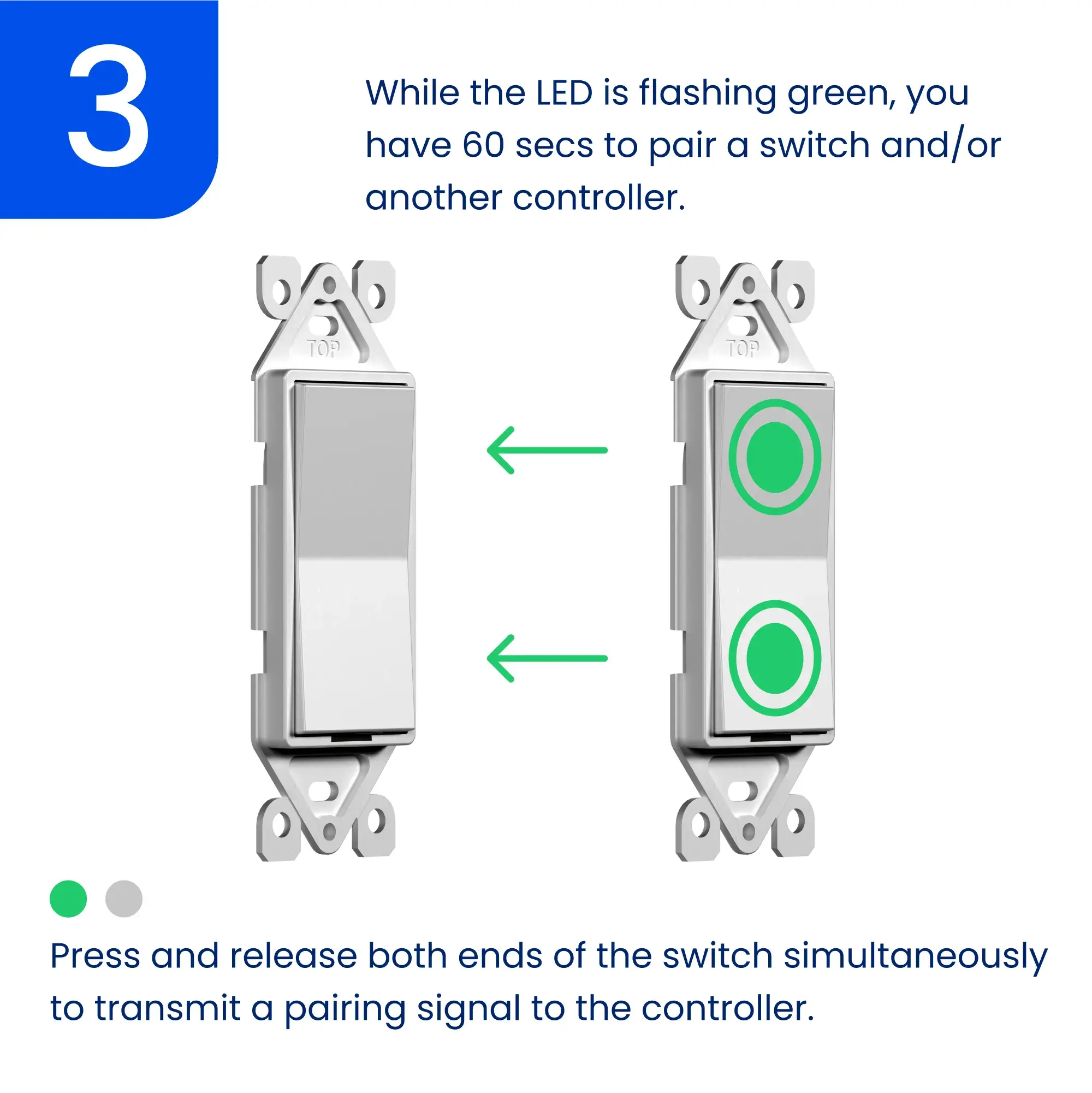
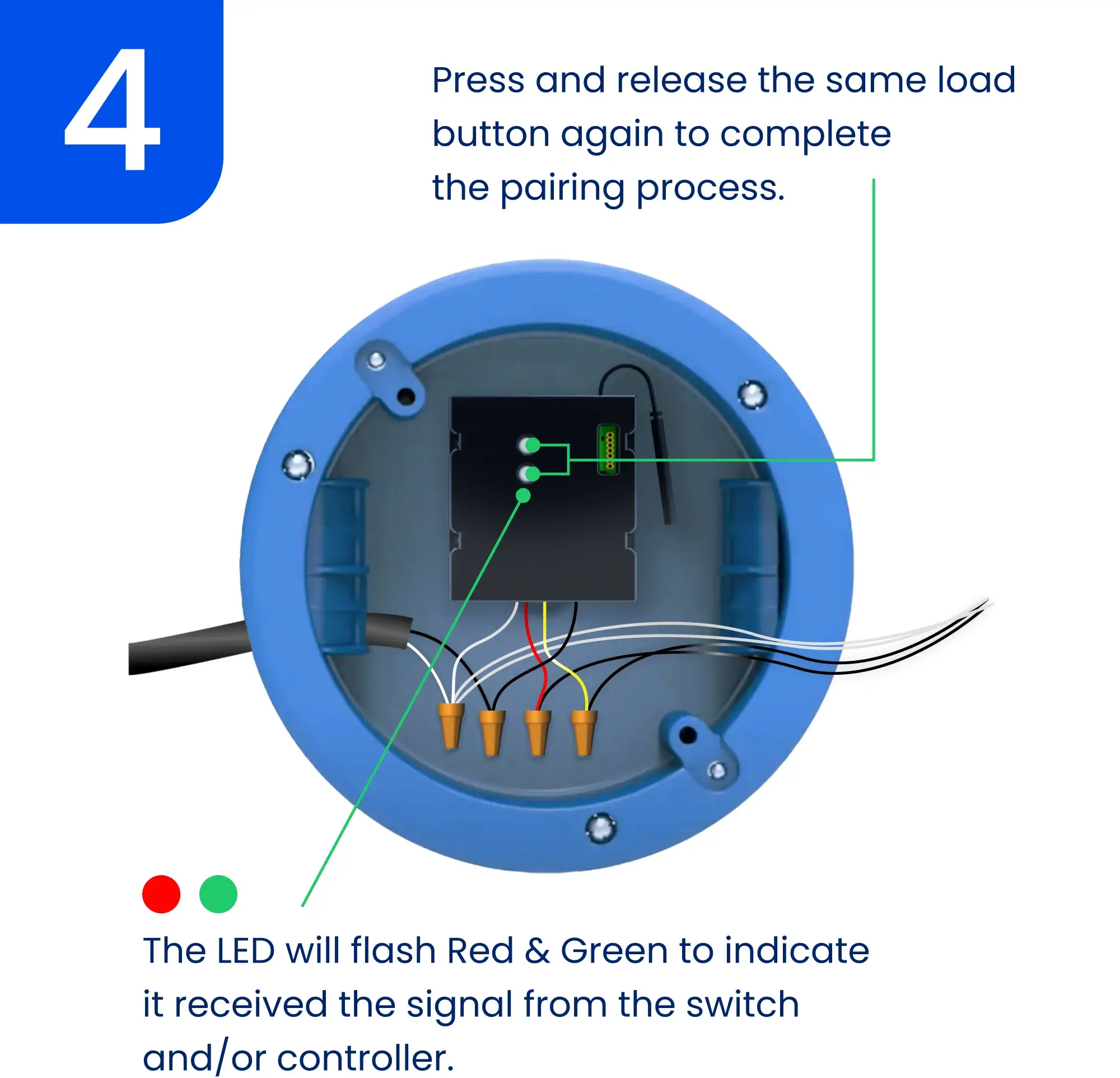
Interruptor regulador
Para aumentar el brillo:
- Presione y mantenga presionado el botón de subir/encender.
- Suelte cuando alcance el brillo deseado.
Para disminuir el brillo:
- Presione y mantenga presionado el botón de bajar/apagar.
- Suelte cuando alcance el brillo deseado.
Si está utilizando la aplicación Levven Controls:
- Disminuya el brillo deslizando hacia la izquierda en el mosaico del controlador en la pantalla del dispositivo.
- Aumente el brillo deslizando hacia la derecha en el mosaico del controlador en la pantalla del dispositivo.
Configuración Avanzada
Configuración de Niveles Mínimo/Máximo de Brillo
Configurar los niveles mínimo y máximo de brillo de un controlador Levven permite a los usuarios adaptar el rango de luminosidad del controlador según sus preferencias. Esta personalización permite ajustar con precisión la iluminación para satisfacer necesidades específicas y crear la ambientación perfecta para cualquier situación. Al establecer los niveles mínimo y máximo de brillo, los usuarios obtienen un control preciso de su iluminación, mejorando el confort y la eficiencia energética.
Establecer el Nivel Máximo de Brillo del Atenuador
Mantén presionado el botón de subir/encender del interruptor para aumentar el brillo de la luz hasta el nivel deseado.
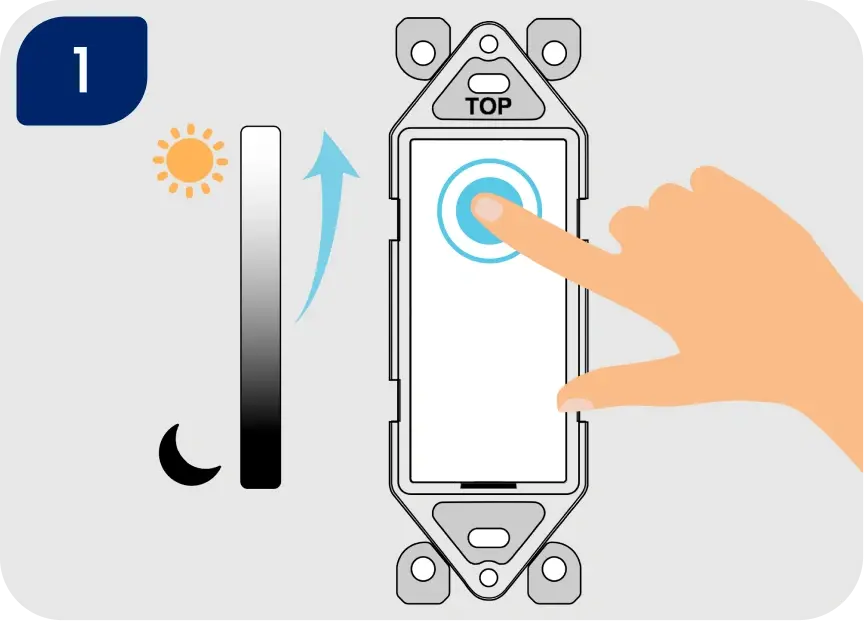
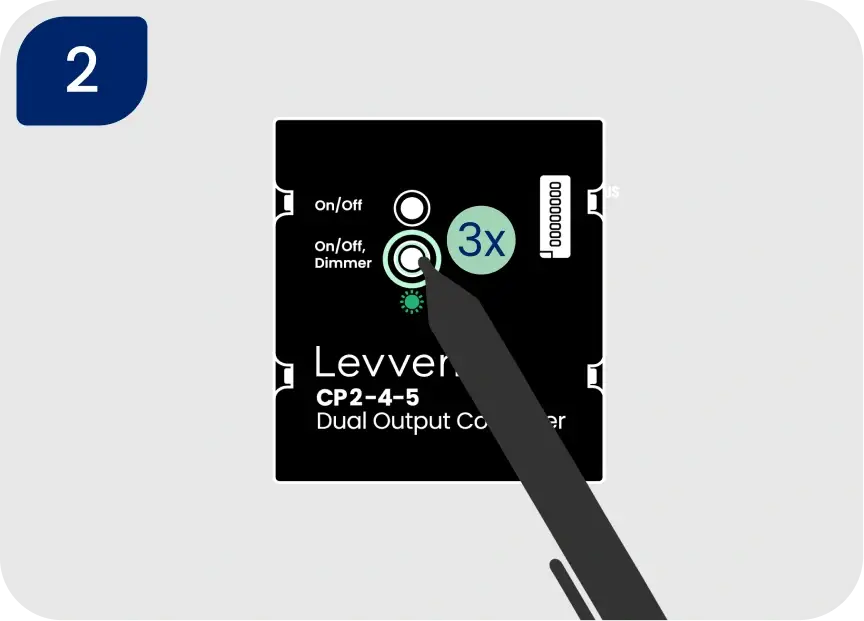
Haz triple clic en el botón del par SEGUNDO/INFERIOR del controlador. Esto establece el brillo máximo. El indicador LED del controlador parpadeará en verde para confirmar que la configuración se ha guardado.
NOTA: Si el LED parpadea solo en rojo, restablece el controlador de energía a los valores de fábrica e intenta el proceso nuevamente.
Establecer el nivel mínimo de brillo del atenuador
Mantén presionado el botón de bajar/apagar del interruptor para disminuir el brillo de la luz hasta el nivel deseado.
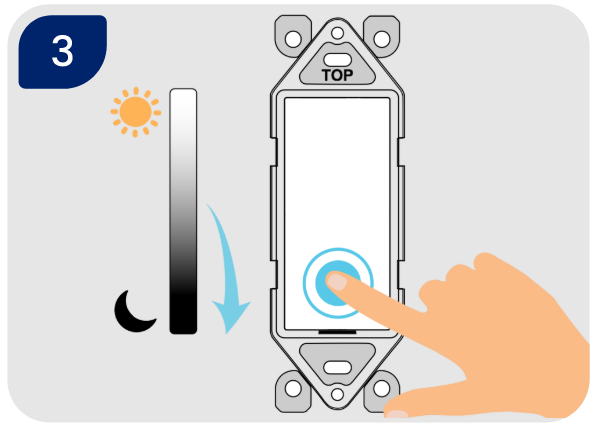
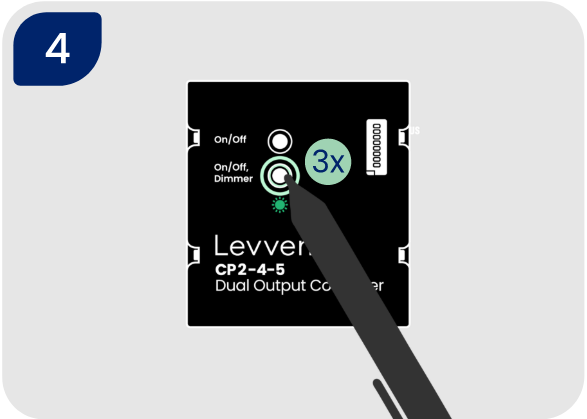
Haz triple clic en el botón del par SEGUNDO/INFERIOR del controlador. Esto establece el brillo mínimo. El indicador LED del controlador parpadeará en verde para confirmar que la configuración se ha guardado.
Restablecimiento suave del controlador CP2-4-5 (solo configuración)
ADVERTENCIA: Esto restablecerá la configuración del atenuador (niveles mínimo y máximo) y los interruptores emparejados con este controlador.
- Para restablecer suavemente la configuración del atenuador del controlador y/o los interruptores emparejados, mantén presionado el botón SEGUNDO/INFERIOR durante cinco segundos.
- El LED del controlador parpadeará en ROJO tres veces para confirmar que los interruptores emparejados y las funciones de la salida han sido borrados.
- Cualquier interruptor que se haya emparejado previamente con este controlador deberá emparejarse de nuevo: Emparejar un interruptor con un controlador.
Restablecimiento de fábrica del controlador de energía
- Para restablecer el controlador a los valores de fábrica, mantén presionado uno de los botones de grupo/par durante 10 segundos. El controlador parpadeará en rojo 3 veces al llegar a los 5 segundos para indicar que los interruptores emparejados y las funciones han sido eliminados.
- Después de los 10 segundos, el LED parpadeará en rojo 10 veces para confirmar que el controlador ha sido restablecido a la configuración de fábrica.
Opcional: Configuración en la aplicación Levven Controls.
Agregar un nuevo controlador es fácil con la aplicación Levven Controls. Para usar la aplicación y añadir controladores a tu grupo de hogar, necesitarás un Levven Q Gateway.
Si necesitas configurar tu Q Gateway, dirígete aquí para comenzar: Soporte para Q Gateway.
Si tu Q Gateway está configurado y estás usando la aplicación Levven Controls, dirígete aquí: Gestión de dispositivos. .
¿Necesitas más ayuda?
Prueba estos siguientes pasos: